




















Workspace 365 was growing rapidly and they noticed that conversations, goals and evaluations were taking up a lot of time, while the overview was lacking. In this customer case you can read how they made the step from separate documents to one central way of working, creating peace and grip.
🎥 No time to read? Then watch the video and hear from Ingrid and Robin of Workspace 365 ☝️
From separate documents to one way of working
At Workspace 365, they were interacting a lot. Monthly check-ins, a year-end meeting at the end of the year, and plenty of consultations in between. Sounds good on paper, but it felt different in practice.
For Learned, we had monthly conversations between manager and colleague. And at the end of the year, we conducted an official evaluation moment. These kinds of conversations were always prepared on paper. So it was quite an intensive and unreviewable process.
Ingrid van den Rijen – Head of Talent at Workspace 365
Therefore, the desire was very specific. Workspace 365 wanted more footing within their organization and one way of working in which conversations, goals and feedback come together. No more individual lists per manager, but one central place and one clear framework so that everyone is looking at the same picture.
When I look at the colleagues, they actually didn’t have a very clear understanding of what was discussed in month one versus what was discussed in month twelve. And also for a manager to really do an evaluation over the year quickly became an evaluation over the past two months instead of an entire year.
Ingrid van den Rijen – Head of Talent at Workspace 365
Learned as a central place for goals, conversations and evaluations
With Learned, that way of working is now in place. Managers and employees set their goals based on skills and KPIs appropriate to the position. Not just what someone has to achieve, but also what skills go with it. In this way, both parties know in advance what they are talking about.
Learned has helped very well to make really clear what the different job profiles are, what the different levels are, what the corresponding behaviors are, so that people really know: what do I have to do for the next step that I would like to take within the organization.
Ingrid van den Rijen – Head of Talent at Workspace 365
During 1-on-1 meetings, they grab the same goals over and over again, and progress is tracked in Learned, rather than in separate notes. Development thus becomes an ongoing conversation, not something that comes back once a year in a year-end meeting.
The method of evaluation is also the same everywhere. Workspace 365 works with one clear evaluation framework. This provides guidance for managers and clarity for employees. You know better what you are being held accountable for and where there is still room to grow.
What Learned helps me a lot in supporting my team members is that so I can see very well how they are developing. How did they perform last quarter and how are they doing now? Instead of looking at it once a year, we now look at it four times a year and you can easily see at what level they are developing very well and where they need a little more attention.
Robin Severein – Team Lead Customer Success at Workspace 365
The AI coach in Learned cleverly capitalizes on this. It helps you prepare and suggests questions to ask during the conversation. This comes in handy when you are searching for the right words or want to make sure you hit the right topics. This makes it easier to prepare well for an interview. Without spending extra time on it.
In addition, call scheduling is fixed and remains manageable. With templates, clear notes and automatic tasks, agreements are recorded and followed up immediately. There is no need to work everything out afterwards or to remember what was agreed. Reports then provide insight into performance and potential, so that choices for development and remuneration are better substantiated.
What this gives Workspace 365
For Workspace 365, Learned primarily provides peace of mind and clarity. Employees know better what is expected of them and which next step suits their growth. It becomes much more concrete what is going well and where there is still room to develop.
The biggest advantage of Learned for me is that I have a very good insight into how people feel within the organization, how performance is going within the teams, where there is development within the teams and where people want to go within the organization, so what their next step might be. Ultimately that ensures that we can retain talent within the organization and that’s just super nice and that actually keeps the front door closed.
Ingrid van den Rijen – Head of Talent at Workspace 365
Managers see at a glance where someone stands, which results count and which development has the most effect. Goals no longer disappear into documents that no one opens, but remain a fixed topic of conversation on which you can focus together.
I use Learned in particular to have and keep a good overview of the team’s development. Before this we basically did everything in separate files and now we have a very nice overview of what that looks like and how the career path can also start to progress within Workspace 365.
Robin Severein – Head of Talent at Workspace 365
Talent thus remains visible, engaged and on the move. Working with Learned makes the way Workspace 365 works smarter and more consistent. Preparation and follow-up is faster, every conversation results in concrete actions, and everyone uses the same standards. The result is more focus and continuous improvement, without teams spending a lot of time on administration. So Workspace 365 can continue to grow quietly with a culture where performance and development go hand in hand.
Implementation in the form of a bingo card
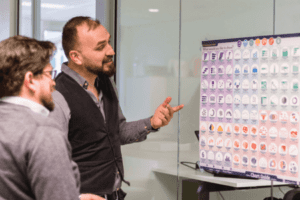
Later, we also took our colleagues through the implementation of Learned through a bingo card. On it were various activities they could do to discover functionalities within the app and actually encourage usage. And linked to that were prizes to be won that were linked to personal development. For example, people could buy a book that they found interesting to explore further. So that was very nicely received and certainly stimulated the use of Learned.
Ingrid van den Rijen – Head of Talent at Workspace 365
👉 Wondering what we can do for you? Schedule an inspiration session and we’ll take a no-obligation look with you.