
Do you want to get started with the growth and development of colleagues in your organization? Then it might be useful to purchase Performance Management software. Discover here how to choose the best system.
Ready to get started? 👉 Open the checklist: Choosing Performance Management software
What is Performance Management software?
Performance management is the ongoing process of evaluating employee performance and coaching them to improve their skills. This includes all conversations in your HR cycle – from 1-on-1 check-ins to performance reviews or evaluation meetings.
A Performance Management system helps you to:
- Set clear goals
- Measure employee performance and provide targeted feedback
- Develop skills
- Adjust behavior
3 types of Performance Management systems
If you want to get started with Performance management, you can choose between 2 types of systems or software packages.
1. HR-core or HRIS system that also offers Performance Management
If you work with a general HR administration system, it may be an option to choose the Performance & Development module within your existing system. If your HR system offers it, of course!
Examples of general HR systems are:
Afas, BambooHR, HiBob, Nmbrs, Officient, Personio, SD Worx and Workday.
The advantage of an integrated solution is:
- You already have the software system, or only need to purchase one system
- You don't need to integrate your personnel data with a standalone tool
- It's also easy for employees and their managers: they only need to use 1 system
Disadvantages may be:
- An HRIS is not a specialized system for Performance and Development
- The options are limited: there may be few to no options for setting development goals, tracking goals, providing ongoing feedback, giving feedback based on skills and behavior, or analyzing data
- This lack of analyzed data in particular can mean that you cannot use an HR administration system for creating a 9-grid or for strategic workforce planning.
2. Tool for reporting or digital personnel file
Within general HR core or HR administration systems, there is also special software for recording conversations and agreements with employees.
In these, you don't just keep personal data, the contract and salary, but also:
- Reports from performance and evaluation meetings
- Meeting reports from other 1-on-1 conversations
- Notes and feedback from managers
- Information about promotions
- Other written agreements
Examples of reporting software are: AFAS or SD Worx.
The advantage of such a system is that you build a digital file for employees.
The disadvantages of these software tools:
- There are often no integrated options for recording ongoing feedback
- You cannot maintain a continuous dialogue between employee and manager
- Few to no options for setting development goals
- No options for tracking goals
3. Complete performance management solution
A complete solution for Performance Management such as Learned is a specialized tool.
You can purchase it separately, or integrate it with an HR core system.
As the name suggests, the advantage of these specialist tools is that they help you set up an evaluation cycle and Performance Management process.
These tools have extra features:
- A good foundation: you first establish the assessment criteria, such as skills, competencies and KPIs required within a certain role
- You can create a digital conversation cycle (instead of just recording appointments or conversations)
- You start an evaluation cycle all at once
- Automatic invitations and reminders by email for an evaluation round
- You often have a skills 'library' or competency matrix
- You can set up KPIs and learning or development goals, and link individual goals to team goals
- You can also request, give and record 360-degree feedback (in addition to feedback from managers about their team members)
- You collect HR insights about team performance, such as their skills, the skill gap and employee satisfaction
The disadvantages may be:
- It is a separate tool, but you can integrate it with your HR administration system (such as Afas, HiBob, Nmbrs or Personio)
- The costs for separate Performance Management software may be slightly higher
But in return you get access to special features for setting up an evaluation cycle and useful data for strategic workforce planning.
🎥 Want to see what this looks like in practice?
Ingrid from Workspace 365 is happy to tell you how they use Learned!
💡 What functionalities should you look for when choosing a Performance Management system? Read on below 👇
Choosing a Performance Management tool: what to look for?
If you go for software specifically made for performance management, it's important to pay attention to a number of functionalities.
Use this checklist for Performance Management software! 👇
1. The foundation: job profiles & job framework
Can you use the software to:
- First, establish concrete assessment criteria? And clarify what is expected in a role?
- Develop a job profile based on soft skills, technical skills, responsibilities, and KPIs?
- Include core values in a job profile?
- Create a 'library' of skills and competencies, or a skills matrix?
- Link job profiles to job levels and your job architecture?
Tip: all these features can be found in Learned's Performance Management system
2. Evaluation meetings
- Can you create a digital evaluation cycle or conversation cycle?
- Can you automatically start an evaluation round with one click?
- Can you automatically send emails with invitations and reminders for evaluations?
- Can you link performance and evaluations to compensation?
3. Feedback, goals and development
Can you with the software:
- Also request and give 360-degree feedback from colleagues?
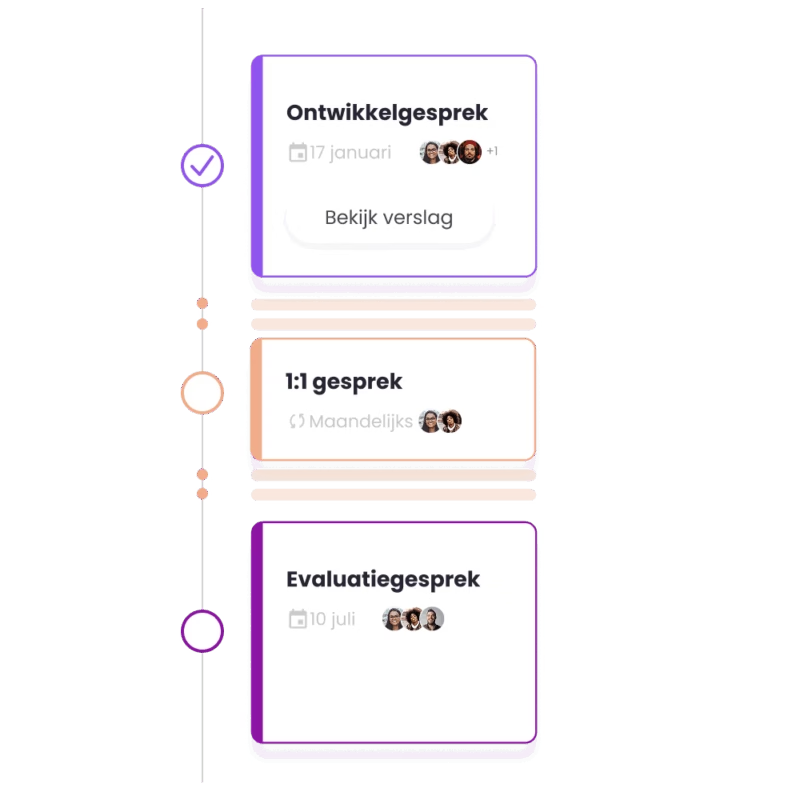
- Not only conduct formal evaluation meetings, but also hold 1-on-1s and development conversations throughout the year (e.g. monthly)?
- Continuously record feedback from 1-on-1s and development conversations, in a continuous dialogue?
- Set up development goals to follow up on evaluations?
- Link individual goals to team and organizational goals?
- Provide insight into how employees can grow vertically or horizontally using career paths?
4. HR data and reporting
Additionally, one of the biggest advantages of specialized Performance Management software is that it gives you insight into performance, skill levels, and other useful HR data that you can use for strategic workforce planning.
Feature checklist:
- Do you, as HR or a manager, gain insight into team members' performance?
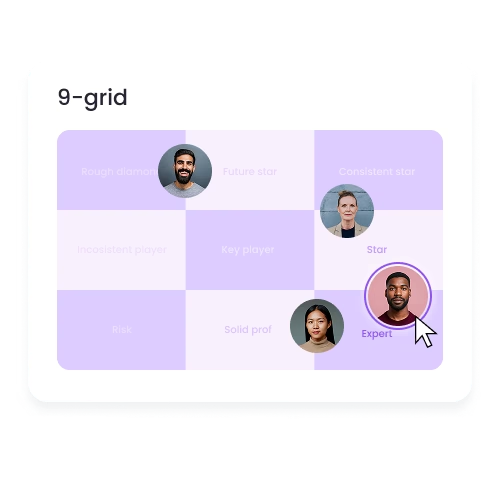
- Can you compare and visualize performance, for example, in a 9-grid?
- Can you filter data in the way you want? Such as by team, department, per quarter, or year?
- Is there also an option to measure employee satisfaction?
- Can you easily export data for your own analyses? For example, as raw data to CSV, Excel, your BI system, but also to your HR core system (for this, you can also look at integrations)
Tip 💡 If you already use an HRIS or HR core system, then it has many advantages if your Performance Management tool integrates with it. Our software offers integrations with every HRIS software
5. Security, ease of use and accessibility
Also important are features that ensure the software is safe, easy, and accessible to use.
- User-friendliness: Is the software easy to use?
- User-friendliness: Is it easy for users to log in? This can be done with an integration for SSO (Single Sign-On)
- Accessibility: In addition to a desktop version of the software, is there also a mobile app for employees?
- Accessibility: If you are a multilingual organisation, is the software (on desktop and mobile) available in more languages than Dutch and English?
Did you know that Learned's software is available in Dutch, English, German, French, Spanish, Portuguese, and Polish? And that you can send out evaluations in 22 languages? 🇳🇱🇩🇪🇫🇷🇪🇸 Read more about our languages here
- Security: Is the software ISO-proof? For example, what data is shared with third parties? You can check this in the data processing agreement or DPA (Data-processing agreement)
- Security: Is the system compliant with the European GDPR law or AVG (Algemene Verordening Gegevensbescherming - General Data Protection Regulation)?
- Security: Is the software hosted in the EU and is the data it processes processed within the EU?
Security: If the software uses AI applications, does the company have an AI Impact Assessment?
6. Support and implementation
You are looking for software that is safe, user-friendly and comprehensive enough.
But additionally, it is a great advantage if you are guided in rolling out new software in your department or organization. Look for a company that offers Customer Success or implementation services.
These are things to look for when choosing the best software:
- How long does the implementation of the software take on average?
- If it takes longer than a few weeks, can your HR department get help with the implementation?
- Does the software company offer support, and through which channels? Is it only via email or chat, or can you also call?
- Do you get personal guidance from a dedicated contact person (e.g. a Customer Success Manager)?
- Does the Customer Success team also support your HR team with internal Change Management in the organization?
For example: how do you get managers, team leads and employees on board with adopting a new software system? An experienced software company like Learned guides you through that as well.
7. Handy extras and AI features
Finally, there are very handy features that help HR and managers not to spend hours preparing for an evaluation round.
These are handy extra AI features to look for:
- Automatically summarize conversations into a meeting report
- AI coaching tips and feedback tips on how to conduct a good (or difficult) conversation for managers
- Automatically forward feedback from email, Teams, Slack and 1-on-1 meetings (so you can have AI evaluations pre-filled, a very handy time-saving feature from Learned!)
Finally, you want to be able to integrate a separate performance management tool with your existing HR core or HR administration system. So pay attention to that and ask about it in the purchasing process.
Checklist [PDF] 📄
Want to get started with determining the best Performance Management software for your organization? Open this checklist and share it with colleagues 👇
![Checklist [PDF] 📄](/images/blog/performance-management-systeem-checklist.png)
Click on the visual and download the PDF that opens, or share the link
Summary
All these Performance Management features make it as easy as possible for you to create an evaluation process that saves you a lot of time. And that is fairer than having employees assessed only by 1 direct manager.
Want to know more about setting up a fair assessment process? 👉 Read on: How to set up your Performance Management cycle smartly and fairly
Ontvang de nieuwste HR-tips
Krijg 1 keer per maand onze tips, e-guides en templates direct in je mail.

Related articles
Discover more about this topic